Show what went wrong. Hide what shouldn’t go with it.
Twenty tools in one editor, the same on the desktop, in the extension and right here. On a screenshot, redaction deletes the pixels for good.
Press Redact, then read the file it wrote
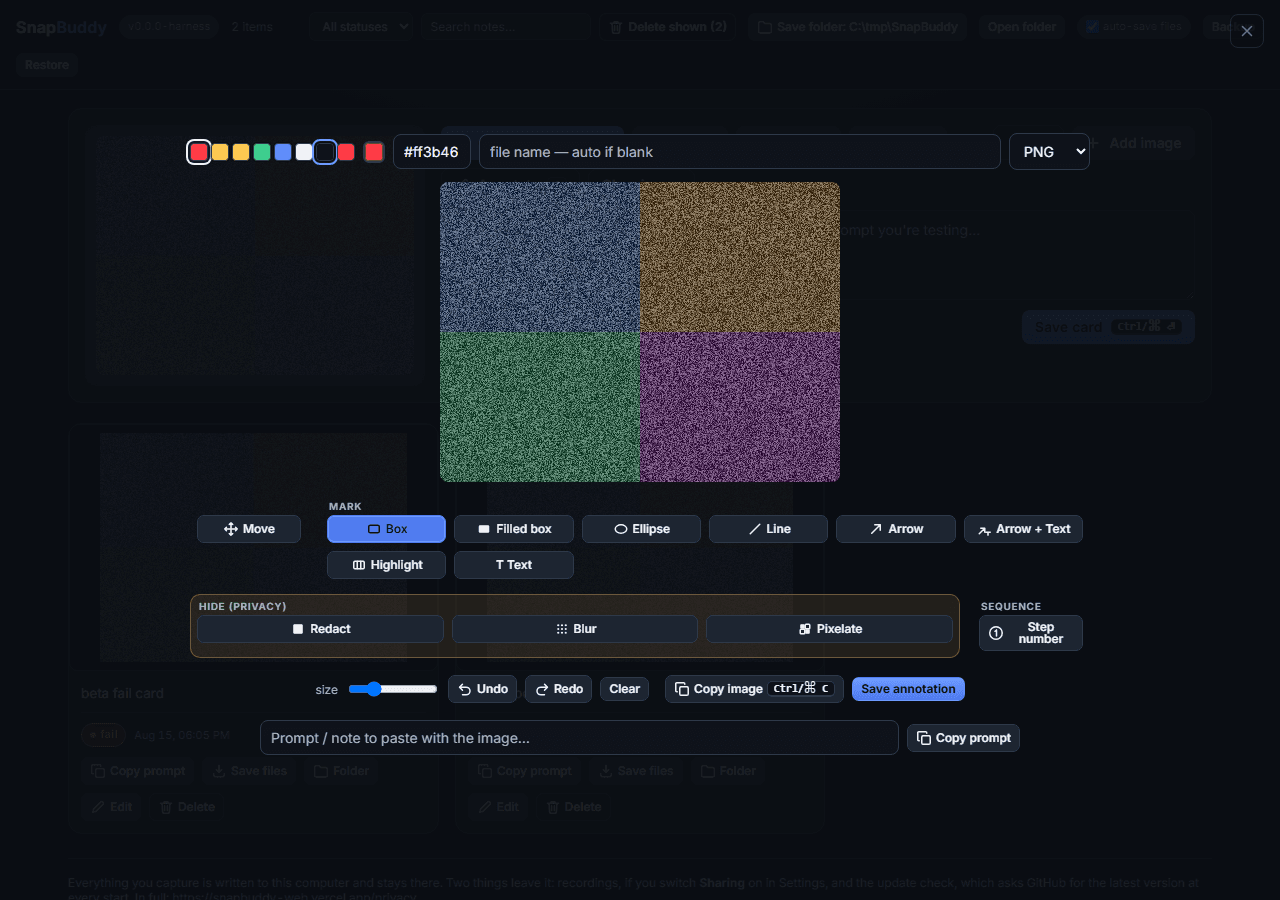
What is below is not a picture of the editor. It is the same file the desktop app and the browser extension run, served here unchanged in a frame, so all 20 tools work, undo works, and the dialog quoted further down this page will stop you on the way out.
The picture in it is a real capture of the SnapBuddy recorder window. Real pixels, including the ones you’re about to cover.
- Pick Redact. It’s in the amber Hide group, beside Grey out.
- Drag a box across the Source row at the top of the picture.
- Press Save annotation.
- The saved file comes back below, and the region you covered is read straight out of it, pixel by pixel.
All of it happens in this tab. What you draw lives here until you reload, and then it’s gone.
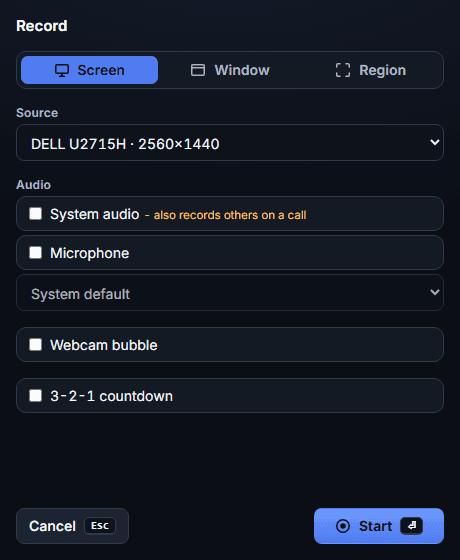
The editor runs in JavaScript, so it is not on this page without it. Everything it demonstrates is written above, and the desktop app runs the same editor with no browser involved.
On a screenshot, redaction removes the pixels
Redact destroys the pixels underneath. Cover a customer’s email address and it’s gone from the saved file, not painted over it. Blur and pixelate obscure a region without removing it.
Marks are baked into the picture when you save, and kept as data at the same time, so the export can describe what was circled as percentages of the frame.
On a recording the same marks are overlays, drawn at playback time. The pixels they cover are still in the file.
The export carries that warning in bold and withholds the positions of those shapes, so the document can’t be read as a map of what was hidden.
The redactions on this recording are not real.
Burn in is how you hand a recording over. It writes a separate annotated copy with the shapes baked in and the effects applied to the footage, and the card keeps pointing at your original take.
In the browser extension the player carries that warning under the video, where somebody about to send the file will read it.
Annotate
Twenty tools.
Two of them
delete for good.
Arrows, boxes, step numbers and text, grouped by what they do to your image. On a still image, redact and grey out destroy the pixels underneath rather than painting over them; blur and pixelate play a region down without removing it.
- One engine, mirrored to the extension and the web
- PNG, JPEG or WebP, named before you save
Every tool, in the group you’d look in
All 20, by name. Mark, Hide (privacy), Obscure, Sequence and Frame carry real labels, so a screen reader hears the same groups you see.
Move and Eraser
2The two that fix instead of add. Move drags a mark you already placed, Eraser lifts a whole mark off in one touch. Eraser sits outside the Hide group for a reason: erasing a redaction brings back what it covered.
- Move
- Eraser
Mark
9Point at the thing. Nine ways to draw a shape, a highlight or a label over the capture. Spotlight dims everything around a region instead of removing it, which is why it lives here and not in the Hide group.
- Box
- Filled box
- Ellipse
- Line
- Arrow
- Arrow + Text
- Highlight
- Spotlight
- Text
Hide (privacy)
2The two with consequences. Redact and Grey out delete what they cover on a still. They get their own outlined band in the toolbar instead of a place in the row, so nobody reaches for one by accident.
- Redact
- Grey out
Obscure
2Blur and Pixelate obscure a region without removing it. Use Redact or Grey out for anything that must not be read.
- Blur
- Pixelate
Sequence
1Numbered discs, in the order you place them, for a report somebody has to follow rather than read.
- Step number
Frame
4The four that change the picture itself rather than draw on it. Crop to a region, turn or straighten, pad the edges with a coloured background, or scale the whole thing. Marks move with it, so what was circled is still circled.
- Crop
- Rotate
- Background
- Resize
Around them: seven preset colours and the native picker as an eighth, a hex field, a size range, and Undo, Redo and Clear on the keyboard shortcuts you expect. Copy image copies the flattened canvas without leaving the editor.
Learn it once. It’s the same editor everywhere.
Draw a mark on the desktop, in the extension or on the web and it behaves the same way, because it’s the same code drawing it. Nobody on your team relearns the toolbar when they change machines.
A build check compares all three copies on every run, so they can’t drift apart.
The desktop splits the editor chrome across three bars and the extension keeps one. That’s host markup, not a second editor: one implementation wearing two layouts.
The third copy runs on the web, in a frame, which is what /annotate puts in front of you with no account and no install.
Cut the middle out and the marks stay on their own frames
On a recording, Annotate here stamps a mark with a three second window at the playhead. Every mark gets a row beside the player with its colour, its type and its window, plus in, out and always buttons to retime it.
Trim the recording afterwards and the windows move with the footage. Annotations and markers stay on the frames they were drawn on instead of drifting by the length of the cut, on both trim outcomes. The default outcome saves a new card and leaves the original take alone.
It asks before it throws your marks away
Pick the file name and the format, PNG, JPEG or WebP, in the editor top bar and they stick to the card, so Save files, Save as and auto save all write the same thing. Type the extension yourself and it’s stripped: shot.png never becomes shot.png.png.
Close the editor with unsaved marks and a dialog stops you first:
Keep your annotations? Closing without saving discards everything you drew on this capture.
Cancel, Discard, Save annotation, with Save annotation focused, so a blind Enter keeps your work. It behaves like a real dialog: announced to screen readers, focus trapped while it is up, and focus handed back when it closes.
Open it now with one of your own screenshots
The web copy of the editor runs unmodified in a frame. Pick an image, mark it up, and the result comes back in the page.
Nothing you open there leaves the tab. Close it and the only copy is the one on your own disk.