




Press and brand

Write about us
without emailing us first.

Boilerplate you can paste, the mark in every size we ship, current screenshots, and a facts block we keep honest. Take what you need, and mail us for anything that is not here.

The SnapBuddy badge: the Bracket Owl, a near white owl face with a heart shaped beak, inside a silver capture frame on a plum disc.

The facts

Everything a fact checker asks for.

All of it true today. If one of these goes stale, that is our mistake and we would like to hear about it.

What it is
A screen capture, screen recording and bug reporting tool for Windows, with a browser extension and a web app.
Category
Screen capture and bug reporting.
Who uses it
QA testers, support teams, designers in review, PMs, and anyone whose job includes the sentence “it does this thing, let me show you.”
The one thing that is different
Record the bug once and the numbered repro steps come out the other end, because the desktop recorder logs where you clicked. The steps are built from clicks alone, never from what you typed.
Platforms
Windows desktop app. Browser extension for Chromium browsers and Firefox. Web app in any current browser.
Versions today
Desktop 0.24.1. Browser extension 1.25.0.
Availability
Invite-only early access.
Annotation
Nineteen tools, and the same editor on all three surfaces. Three of the nineteen remove the pixels from a still rather than painting over them, so a covered email address is gone from the saved file.
Where captures go
A folder you chose on your own machine. Sharing is a switch, and it ships off.
In the browser
On a site you switch it on for, the extension keeps that page’s console output and the network requests that failed. Secrets are stripped out before anything is written down, and what it keeps stays on your machine until you upload it.
Where we are
Based in Prague, Czech Republic.
How big
Small. The person who built the recorder reads the support mail.
Press contact
support@snapbuddy.ai

There is nothing to buy today: the pricing page says what is free and what will be charged for, and the privacy notice lists every item that leaves the machine, one by one.

Boilerplate

Words you can lift straight off this page.

Four lengths and a note. These are the versions we would give you on the phone, so there is no need to ring and check.

  • Product one-liner

    SnapBuddy is a screen capture, screen recording and bug reporting tool for Windows that writes the repro steps from your own clicks.

  • Category line

    Screen capture and bug reporting for Windows.

  • Boilerplate, short

    SnapBuddy is a screen capture, screen recording and bug reporting tool for Windows, with a browser extension and a web app. Snap a screen, record a take, and mark it up with nineteen tools. The repro steps write themselves, because the desktop recorder logs every click.

  • Boilerplate, long

    SnapBuddy is a screen capture, screen recording and bug reporting tool for Windows, with a browser extension and a web app. Snap a screen, a window or a region, or record a take with audio, then mark it up with nineteen tools. Three of them remove the pixels from a still rather than painting over them, so a covered email address is gone from the saved file.

    Record instead of writing, and the numbered repro steps come out the other end as markdown you paste into whatever tracker you use. Sharing is a switch, and it ships off.

  • A note from the person who built it

    I built this because I got tired of losing arguments to my own memory. I’d see a bug, screenshot it, paste it into a ticket, then spend five minutes typing out what I’d just done. Half the time it came back as cannot reproduce anyway.

    Windows is where most of the world’s software gets tested, and it’s where almost none of the good capture tools live. That isn’t a gap we’re apologising for. It’s the reason SnapBuddy exists.

Assets

Every file we ship, and where each belongs.

Right click and save. All of them are on this domain, and all of them are the drawings the product itself uses rather than redraws of them.

There is no light file and no dark file. The badge is one drawing and it works on any ground, because a filled disc carries its own contrast; the outline marks inherit whatever colour surrounds them, so they take your theme rather than ours, and the favicon carries its own light and dark switch inside the file.

What not to do with them

  • Do not recolour the disc. The plum is #65184E and it does not move with a theme or with an accent.
  • Do not put the plum mark on a dark background. Plum as a foreground scores 1.64 to 1 there, which is invisible. Use the badge instead.
  • Do not add a gradient, a shadow or a bevel. Silver here is one flat grey, not a metallic ramp.
  • Do not stretch it, rotate it, or crop the brackets off. The frame corners sit 93 percent of the way out from the centre, so a tight circular crop eats all four. Use the avatar export for anything cropped to a circle.
  • Do not redraw the face. If you need a size we do not ship, mail us and we will draw it.
  • Do not use the mark to imply we endorse something. Naming us in a piece is welcome. Putting the owl on your own product is not.

Minimum size is 16 pixels, and mascot-micro.svg is the file for it. Below about 44 pixels the brackets merge into the head, which is the whole reason the ladder above has five rungs.

Screenshots

Current shots of the real thing.

Every one of these is the shipping build on Windows. The caption says what you are looking at, so you do not have to guess at one of your own.

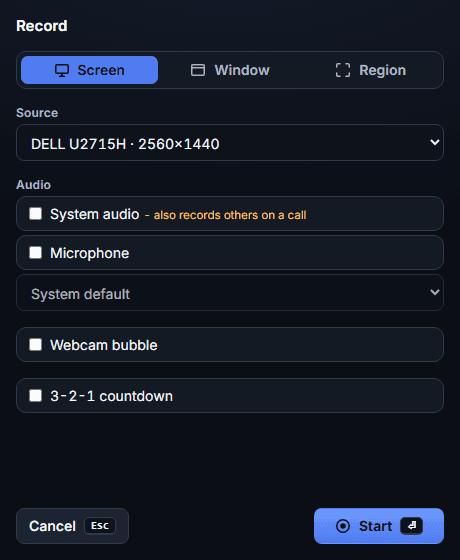
  • The SnapBuddy pre-record panel: a source list above separate system audio and microphone toggles, a microphone device select, a webcam bubble toggle and a countdown toggle.
    The pre-record panel. What to record, which audio, and the frame rate, all decided before anything starts rolling.
  • The recording pill, paused: an amber dot, a timer reading a paused take, and buttons for the webcam, resume, Stop and Discard.
    The recorder pill, paused, at its actual size. Small enough to stay out of the shot, and it tells you which state you are in.
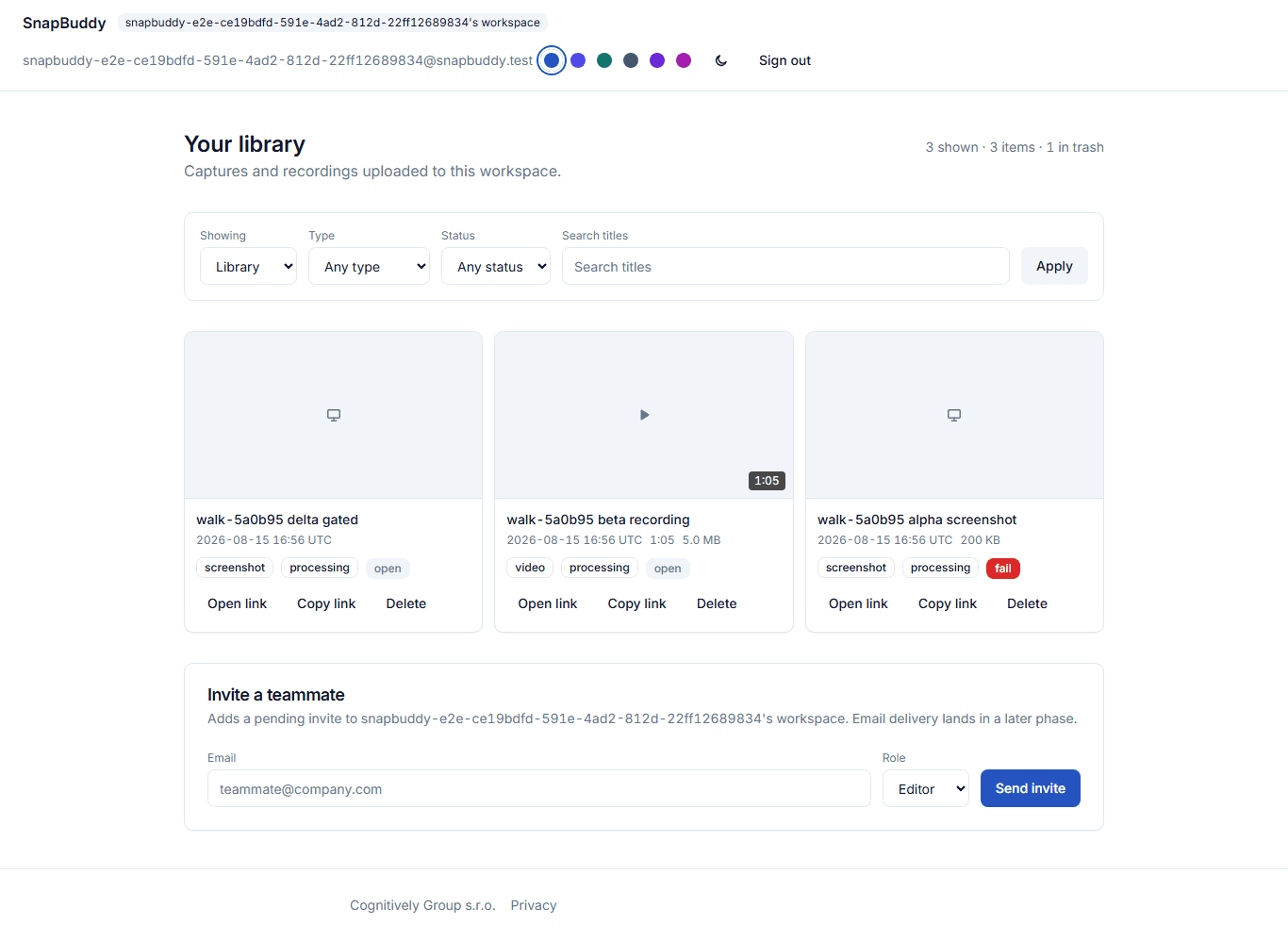
  • The SnapBuddy web app in light theme: a library of captures with their titles, tags and dates.
    The web app. Same editor, same library, nothing to install.
  • The SnapBuddy web app on a narrow phone screen, its library stacked into one column.
    The web app on a phone, at 375 pixels.
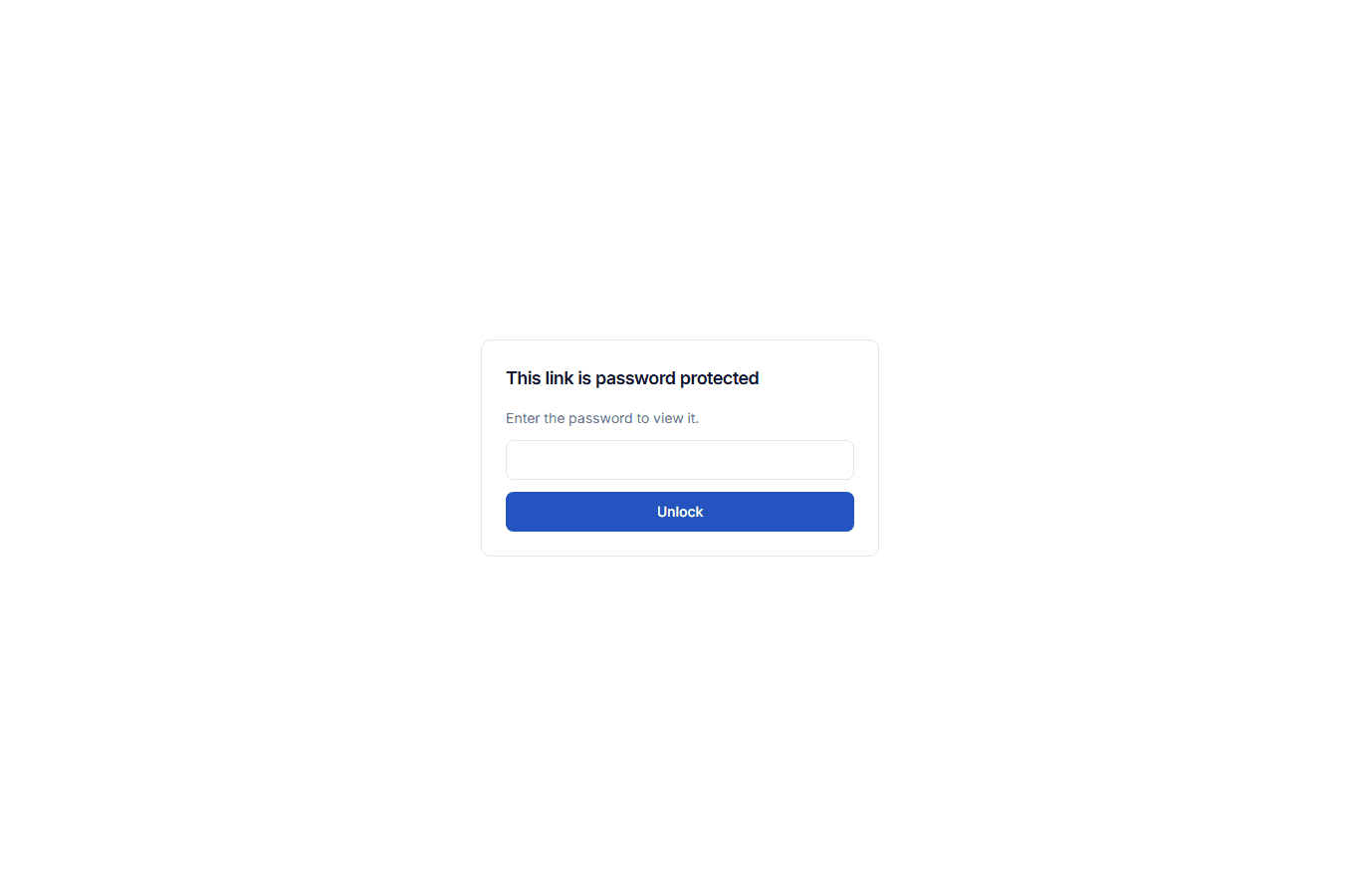
  • A shared capture behind a password gate: a lock, one password field and a button, with no sign-in anywhere on the page.
    A shared capture behind a password. Support teams use this to send a customer a marked up screenshot without giving them an account, and the gate holds with JavaScript switched off.
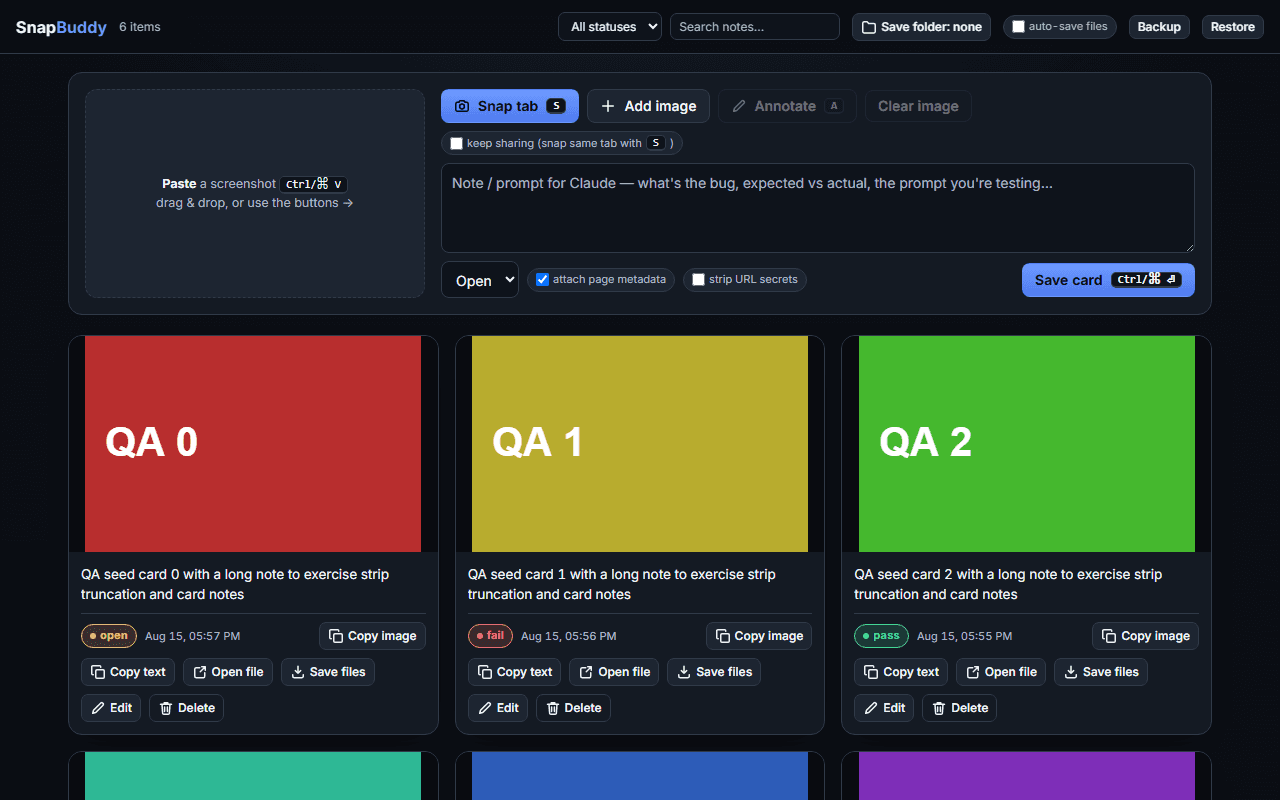
  • The SnapBuddy browser extension board: its own library of captures inside the browser, in dark theme.
    The browser extension’s own board. It snaps and records a tab, a window or a screen, and for a site you switch it on for it keeps that page’s console output and the requests that failed.
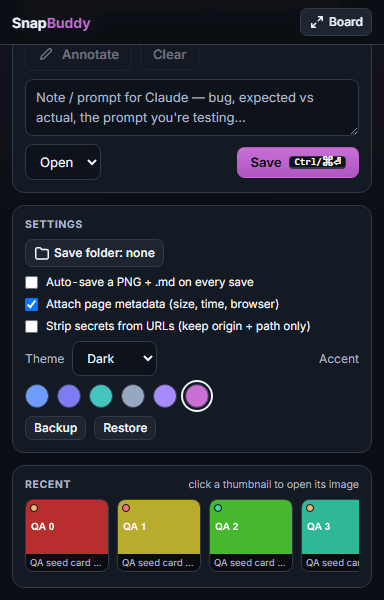
  • The SnapBuddy extension appearance panel: a theme choice above a row of accent swatches, with magenta selected.
    The extension’s appearance panel.

Brand

Meet the
Bracket Owl.

Four capture brackets, and the top pair doubles as the brow. The disc carries recorder state rather than the pupils, because red on plum measures 2.42:1 where a graphic needs 3:1. A whole coloured circle also reads at 16 pixels in a tray, where two red dots do not.

Plum #65184E stays a disc and never becomes a page band. Two tokens carry it: --brand-disc is the fill and never moves with the theme, while --brand is the foreground and lifts to #CE7EB6 on a dark ground, because the disc value scores 1.64:1 as text. Emerald #10B981 is the second tone, and it marks what a check in this repository holds true.

  • Idle#65184E
  • Recording#DC2626 · pulse
  • Paused#B45309 · still
  • Workinglids closed

The paused amber is #B45309 and not the lighter amber the recording pill uses. At the pill's value the silver frame falls to 2.03:1 against the disc and the brackets vanish into it, so the two ambers are measured against the two grounds they sit on.

  • outline48 and up
  • compact24 to 40
  • micro16 and 20
  • #65184Edisc
  • #CE7EB6foreground
  • #10B981accent
  • #C8CFD8frame
  • #FAFAFAmark

The mark

Why an owl, in three facts.

The brief was one line: simple, yet wise beyond its means. The answer was a face found inside the capture frame itself, so none of it is decoration.

  • The brow is the frame

    The top pair of capture brackets is also the owl’s brow. Snap wears the viewfinder it works with, so the wisdom is structural, not decorative.

  • The beak is a heart

    Worn where other birds keep something sharp. Evidence without blame is the whole point of the buddy half of the name.

  • The disc tells the truth

    Plum at rest, red while recording, amber when paused, lids closed while working. The face is a status display by design, and it moves when the state changes and at no other time. Snap never performs.

Naming and capitalisation

  • SnapBuddy is one word, capital S, capital B. Never Snapbuddy, never Snap Buddy, never SNAPBUDDY.
  • The owl’s name is Snap. The Bracket Owl is its formal title: use it once, the way you would use a passport name.
  • In prose we are SnapBuddy, not the domain. The domain belongs in a link, not in a sentence.
  • You snap a screenshot. Do not verb the product name.
  • On first mention: SnapBuddy, a screen capture and bug reporting tool for Windows.

Theming

Six accents.
Two themes.

The window beside this is the demo rather than a picture of one. Pick an accent or flip the theme and it repaints through the same stylesheet blocks the app repaints through. The page around it stays dark, because this surface has one theme by design and the choice belongs to the product.

  • Six accents, blue by default
  • Light, dark, or whatever the system is set to
  • Contrast measured by a build check, not eyeballed
  • One palette across the app, the extension, the editor and the web
SettingsAppearance
Theme
Accent

These controls are the real thing, scoped to this window. They repaint the demo only; your saved theme and accent are set in the app and in the dashboard, and nothing here changes them.

Origin story

Where the owl came from.

The brand story, as a fable, because it explains the product better than a paragraph about the product does. The moral at the end is the whole thesis.

Chapter I

A forest that shipped at midnight

There is a forest where the trees glow after dark. Little windows in the bark, bright rows of them, each one a thing somebody built and left running. At night they flicker. They stall. They break quietly, and leave no mark by morning.

Chapter II

Seen once, believed never

An owl lived at the top of the tallest pine, and owls see in the dark. It watched a moth slip through a window that was supposed to be shut. It watched the window shiver, drop its lights for half a beat, and carry on.

In the morning the owl told the woodpeckers, who build. “Cannot reproduce,” they said. They had hammered at that window all day and found it perfectly shut. The moth was never there when anyone looked. Moths are like that.

Seeing is not the same as showing. That was the night the owl learned it.

Chapter III

Holding a moment still

So the owl taught its eyes to blink slowly enough that a moment got caught between the lids and kept. A held moment is a snapshot, and the owl grew so good at them that the forest dropped its old name and called it Snap.

A kept moment was not enough on its own, so Snap learned to mark the picture. An arrow, so a reader’s eye lands where its own did. A number on each thing that happened, in the order it happened. Some moments hold a secret that is nobody’s business, so Snap learned three marks that hide. On a still picture they do not paint over the pixels. They remove them.

Chapter IV

Some truths only move

Some bugs will not sit still for a portrait. So Snap learned to carry a whole stretch of night home: a screen recording, taken from behind a pill of chrome small enough to stay out of the shot. While the film rolled, Snap kept a plain list of its own footsteps beside it, every move and every click, so the list could be read back as numbered steps. Not magic. A careful bird writing down where it walked, which is why the steps are right.

Chapter V

The heart in the beak

Snap does not show you what broke so that anyone looks foolish. Look at the beak: it is a small heart, worn where other birds keep something sharp.

Proof is a kindness. A clear picture of what went wrong is how friends fix things without arguing over whose memory is right. The owl is not a watcher, or an auditor, or a small policeman of the night. It is a buddy. It sits beside you, it sees what you saw, and it helps you say it.

A bug you can show is a bug you can fix.

The forest still breaks at night. The difference is the witness.

The ask

Writing something?
We would like to help.

Mail us and you get a person. If you need a screenshot we have not shot, a fact we have not printed, or an early look at the Windows build, ask for it.